Suositut tekstit

Showing posts with label games. Show all posts

Thursday, March 17, 2011

Jailbreaking Your iPhone, iPod Touch or iPad


Jailbreaking, what is it? Is it illegal? What does it do?


Things to know:
iDevice-> iPhone, iPod Touch or iPad

Jailbreaking is a way for your iDevice (Apple's iPod Touch, iPhone, iPad) to work the way you want it to. For example, you can "unlock" iPhones, so that you can use any operator with them, and not just the one(s) available for iPhones in your country. Other examples of what jailbreaking is used for: all kinds of "Cydia apps" (applications only available from an application called "Cydia", which can be installed after having jailbroken the iDevice), +others...

Jailbreaking is NOT illegal, but however, downloading copyrighted software (applications) is as illegal as downloading copyrighted movies, games and other for free on the computer. Unfortunately, it is a major factor, as many jailbreak their iPhone, iPod Touch or iPad only for getting normally paid apps for free. I am NOT encouraging you to do so, but will post tutorials about how to do it, but ONLY FOR EDUCATIONAL PURPOSES!!!


Now... Go to THIS page for the tutoriel on how to jailbreak an iDevice.

Wednesday, December 22, 2010

Christmas Special!!! - Get A Free Game Copy of Penguins Arena!!!

christmas_santa_claus_3d_screensaver_desktop_screen_savers-831.jpeg (800×600)
"I just tweeted about @taptaptap's launch of Voices 2 for iPhone and got the addictive $20 Penguins Arena FREE! http://is.gd/j3aYL"


That's what all my followers could see on my Twitter profile yesterday, when I tweeted it. You too can get the Penguins Arena game for TOTALLY FREE!!! All you have to do is to go here, sign up at Macheist or sign in (in case of you being already registered at Macheist), then just tweet about it (really, really easy, only a few clicks and it will be automated) and you will get your free serial number. Now you are being asked to download the game itself, where you can register by using your serial number.


Sincerely
-TheOnlyTrueWriter/Ramseslll/Ramsesxlll
merry-christmas.png (329×391)merry-christmas.png (329×391)

Monday, December 20, 2010

Patch Notes - 20.12.2010 - 1.0.1

This is what I call a "patch"; when I change the background, change adress, change the name of the blog etc. The most important thing for you to know is that a patch means changement. This wasn't really my first patch, because the other ones were "betas"; they don't count:


  • Changed the background
  • Moved "Best Mac Apps (Free)" and "Best Mac Apps (Paid)" into a same page; "Best Mac Apps (Paid/Free)
  • Moved "Best Mac Games (Free)" and "Best Mac Games (Paid)" into a same page; "Best Mac Games (Paid/Free)"

Friday, October 8, 2010

How to use iHaxGamez

iHaxGamez is a cheat engine for mac (yes you can cheat games on mac, and yes there are games for mac). For downloading, go here.

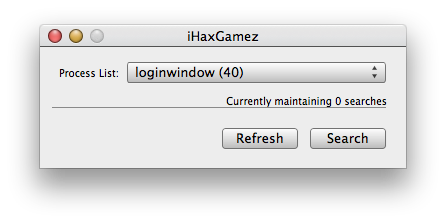
So... Now that you have downloaded and installed iHaxGamez for mac, you have to open it, then you get a window like in the picture below:


Then, you will have to choose the browser that you use to play your game, or the actual game from the list as below where I have chosen Google Chrome, because it's in Google Chrome that "my" game is running:


Then you will have to click the "Search" button, and you will a window like the one below:

In this new window, you will have to put in the "Search For" box, the amount of whatever you want to change. Ammo, health, mana, money... For example, if you have 51 bullets/ammunition, and you want to have more/less, then you got to put 51 in the "Search For" box and click "Search".

If you are using a flash game (most games through browsers like Google Chrome and Safari), then you will have to choose the "Flash x8 Mode" for cheating.

Now you most probably got a lot of searches, and for finding the one that you want to change, you will have to go back to what ever game you are playing, and somehow change the amount of ammo/health/mana/etc. that you put in the search box earlier. When you have changed it, shooted 10 bullets for example, then you can put 41 in the "Current Value" (only an example). After this part, there shouldn't be many search results left, and if there are more than one (hopefully 1-5 maximum), then you can just change the amount of all of them (doesn't usually affect gameplay at all).

ATTENTION!!! For changing the value of the "whatever you want", you will just have to double click it in the search results, and change the value. If you still don't understand, then check out my YouTube tutorial about it here (only for non flash games).

Thursday, October 7, 2010

Hi all "MacAppers"!

Hi all "MacAppers"!
This is not an official website of MacApper, but my own blog about Macs, Mac apps, Mac news, Mac games and software and other stuff, that doesn't even have to be related to Macs at all (however, most of the time they still do).

I hope that you will enjoy the content of my blog, that is still not completed, but will hopefully soon be.

-TheMacApper